Showing posts with label adsense. Show all posts

Saturday, March 28, 2009

Google Adsense Reports Embedded in Blogger

Today I saw a Monetize link next to the Layout link in my Blogger Dashboard


Blogger Monetize Link


On clicking on the link I saw an embedded Google Adsense Reports for the blog itself.
A much needed feature this will show reports seperate blogs, this will be quite handy as there are no channels for adsense available in blogger. So instead of these channels we can see reports of each Blog.


Adsense Reports Embedded in Blogger

Adsense Reports Embedded in Blogger

Plus in the coming days we might have other features such as layout of the adsense ads and also changing colours through palette

Update:

You will also see a new adsense channel of your blog in the google adsense reports which might look like this:

Blogger Channel

Thursday, March 26, 2009

Bye Bye Google Video Ads

Inside AdSense: Sunsetting video units feature

Google Adsense reviews its products after certain period of time and it has found that the Google Video Units are not working. They are retiring this feature at the end of April. All the video ad units will be converted to youtube players and there will be no further earning from it.

It's a bad news for all the publishers who were earning a major amount from it. Plus it had a good revenue earning potential.

Saturday, January 19, 2008

ADSENSE's Second Thought about removing adsense referalls

As i wrote in my previous post that adsense is removing referrals for publishers outside North America, Latin America, or Japan will not get any commision even if the referred users are from these countries.

Due to revolt and unhappiness of the publishers and many responses they received from fellow bloggers they have decided to give publishers referral income to all publishers referring publishers from North America, Latin America, or Japan

Adsense stated:

The changes to referrals promoting AdSense will now depend on where your users are located, regardless of your location as a publisher. You'll earn $100 for every user you refer to AdSense who is located in North America, Latin America or Japan when they generate $100 in AdSense revenue within 180 days and they remove all payment holds. You'll no longer be paid for users you refer who are located elsewhere. These changes will go into effect the last week of January.


So it is a win-win situation for both the publishers and adsense.

Saturday, December 22, 2007

Facebook Applications - money making machines


Due to its rapidly increasing popularity Facebook has become a new medium to sell online services and products. Facebook acts as a platform to publicize blogs and earn revenue from it.


I am going to talk about ways to earn $$$ from Facebook Applications.


  1. The best way to monetize your facebook application is by adding Adbrite. Due to various options available Adbrite has started it's new ad solution Facebook ads.


For Facebook Developers this is the best way to increase earnings,
these ads are based on per impression basis(CPM ads) and the ad places are sold to maximum bid. Publishers can also block advertisers showing irrelevant ads.

AD Placement :The ads should be placed on the top and bottom of the facebook applications.

Ads can also be placed on inside your application as is shown in the image above.

Top publishers: Slide.com , Rock you , Ilike , Fight Club

2.
The second way is the best for bloggers - It serves two purposes

  1. Publicizing your blog.
  2. Earning $$$ from it.

You maybe thinking how is it possible ???

It is possible. How i'll tell you

Widgetbox has added new ways to convert their widgets to Facebook Application.


Blog ------------------> Blidget---------------->Facebook Application


Widgetbox doesn't give any details of the earnings but promises to send quarterly earnings by paypal.

Best part is no coding is required to make the application and is an easy way to promote across the web.

Express your views.


Feed ADS


I have always wanted to increase my revenue from feed ads. I tried many programs like adsense,Widgetbucks,bidvertiser and adbrite.

For adding feed ads to my blog feed(in blogger), I copied the ad code and pasted it on the post-feed footer.

The best performing ads were ads from adbrite, because of its dual nature having both CPC(Cost Per Click ) Ads and CPM(Cost Per Impressions) Ads. These ads earned me more by the number of impressions because the number of ads = number of feeds = 25(for feedburner).

The best thing is i get 25 ads per view instead of 3 from adsense.

And this increases my chance to earn by 8 times !!!!

Friday, December 21, 2007

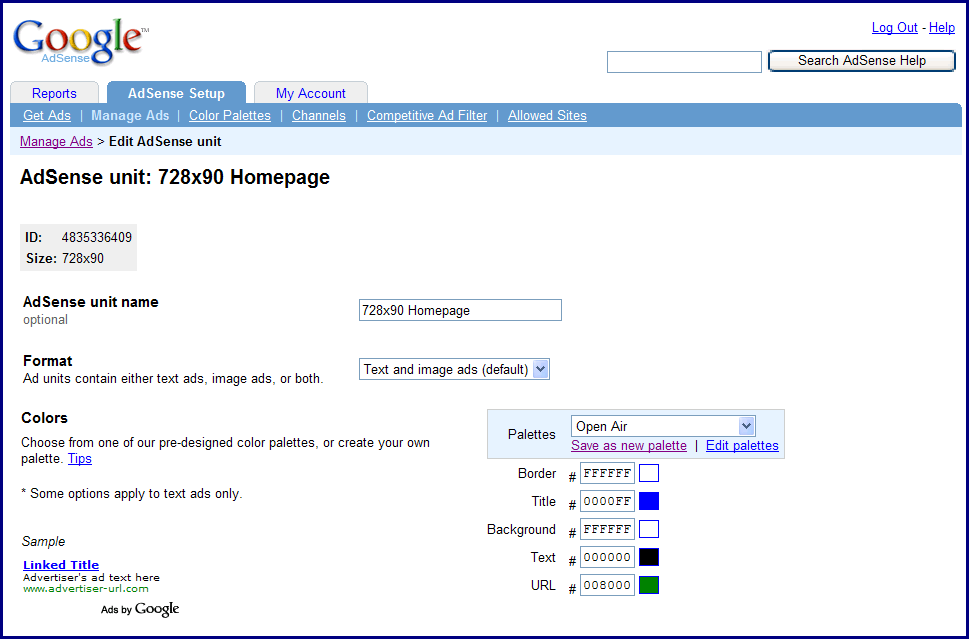
New -Manage Ads


Manage ads with new improved functionality and features.

I got sick and tired of seeing inactive adsense codes in my Manage ads section and i was not able delete because google had not provided any option.
But now they have added a new feature which they call "hide and seek"
In this option the inactive ads can be hidden by checking by an option hide.

In order to see hidden ads we have to check the show hidden ads checkbox and the hidden ads appear.

This option is provided is provided by adsense so that there is no need to delete inactive code.

Way to go Adsense.Thumbs up.

Inside AdSense: Manage Ads gives you more ad functionality

Tuesday, December 4, 2007

How Is the money earned from google adsense calculated

Adsense allow web site publishers with content-centric web sites to add a substantial revenue stream to their site by adding contextual advertising, which can generate revenue anywhere from a few pennies a day to thousands of dollars per month.

The formula for success in the Adsense is fairly simple.

(clicks of Visitors) X (Clickthrough percentage %) X (Ad Value) = Income you earn

Therefore earnings are more the value of the ad is more and it depends on the keywords of your site.

To see the most profitable keywords visit:

Most Profitable keywords


WidgetBucks


Earn $$ with WidgetBucks!


WidgetBucks is a new CPC(Cost Per Click) Program From Mpire Productions.Widgetbucks provides various types of widgets having different shapes,sizes and styles.These Widgets are very interactive and have a good look and feel.These widgets have greater impact on viewers than any other money making widget.These Widgets contain Products like cameras,cellphones,PDA,Gaming Consoles,Softwares and many other Products Sold online.It earns you more than many of the present AD Publishing Programs.It earns you more money If your website targets certain type of products for eg. sites having Gadget reviews,Photography lessons and many other such sites which have viewers looking for specific data.

These Widgets have a Merchsense crawler which can display products related to your site by crawling through your content.If you don't want this feature you can select from different categories such as Pda,software,Electronics etc.

These widgets display about 10 best products on the widgets and each product is displayed individually and rotation between each product can be set from 1 to 10 seconds.

Best thing is that it is a relatively new Program and that is why they are giving a 25$ sign up Bonus and once you have earned another 25$ you can get your payment via paypal.

Widgetbucks offers many styles like:

Wide Skyscraper(160x600)
Skyscarper(120x600)
Medium Rectangle(300x250)
Leaderboard(728x90)
Full banner468x90)
Blog Sidebar(160x300)
Square Pop up(250x250)
custom(660x330)

Inside AdSense: Save your top queries

Now your adsense for search reports will be removed if they are older than a year. If you want that any specific report not to be deleted you should save them before December 10th.After that all the earlier reports will be deleted.
This step is taken by google to remove unnecessary data in their servers.

See this pic:


As quoted by adsense:
IF You use adsense for search i shall let you know about an upcoming change on December 10th that will affect your top queries reports. To prepare for a few upcoming reporting enhancements, top queries data older than a year old will no longer be available. In other words, you'll only be able to view top queries reports dating back one year from the day you're generating the report.

If you have important top queries data which are older than a year old, please run any appropriate reports and save them before December 10th. You may also wish to generate a report dating from the date you started with AdSense for search to today, as data not within the one year window will be continuously removed.
Inside AdSense: Save your top queries

Friday, November 30, 2007

Innovations in google ads

Google is making it's making more relevant and stylish yes stylish. Now you maybe thinking what is style to do with text ads but actually you should the new ROUNDED text ads. The new ad shapes include square, slightly rounded and very rounded. So we get an option to change the shape in ad format option in Adsense Setup tab. According to me rounded look better than square but it all depends on the theme of your website.


The next thing google is to decrease invalid clicks(invalid clicks are links which are clicked unintentionally.
To decrease unintentional clicking google has removed hyperlinks from the text.
In the past, users could click on both the background and full text of an ad, but now they can click only on the title and URL of a text ad. By allowing users to click only on the ad title and URL, google aims to decrease accidental clicks, better aligning visitor behavior with their intent. Overall, the decrease in accidental clicks will keep users on your website, interacting with your content, until they intend to click on an ad.
Finally, this change won't just improve user experience on your site; it benefits advertisers as well.

This will help advertisers give more money for advertising as their ads will be targeted properly.

Manage Ad Units

It was very difficult earlier to change the colour and styling of my google ads because every time i wanted a change in my ads, i had to make a new ads block and copy again and paste the code on my website.

The solution to this problem is Google Adsense's new feature Manage Ads

We're very excited to let you know about an upcoming feature that lets you easily manage your ad units from within your AdSense account. It isn't live yet, but here's a sneak peek so you'll know what to expect in the coming weeks. (We know many of you have been eagerly anticipating its arrival.)

This new ad management feature means that your ad unit settings (such as colors and channels) for new AdSense for content ad units will be saved in your AdSense account every time you generate ad code. Then, if you'd like to change any of these settings in the future, all you do is make the update within your account -- you'll no longer need to manually replace the ad code on all of your pages. For instance, you can quickly change the borders of all your 300x250 medium rectangles from red to blue with just a few mouse clicks. Fancy! We hope that this new feature will help you save time and will simplify the process of optimizing your ad units.

When you see the "Manage Ads" page appear under your AdSense Setup tab, click on Manage Ads and if you have a code already running on a website just copy the code and paste it on the site and then you can Manage all your ads through Manage Ads Feature.

Thursday, November 22, 2007

GOLDEN Rules TO Place Your ADS

Advertisements work well only if the placement is right.The more the no of views maybe proportional to more number of conversions.

1. Place it on a place where it can be viewed the most like placing it between text or the left sidebar.Don't place it at the bottom-right because first of all not every person visits the whole page and secondly we always start reading from the left and so therefore the click through rate is very low compared to those placed in left top.

2.It is always advisable to put your ads pertaining your text ,google has crawler which automatically display ads relevant to the content.

3.Size Does Matter: The larger the size the more readable it is and the more number of ads can be displayed.First see even if it is an image ad the larger the size the more easy it becomes to see the ad.In Adsense we can display upto 5 ads.

4.Text Links: Text links blend with your content and hence can help increase revenue.
Text links are small and precise and very descriptive though image ads look good but they aren't ver helpful in increasing revenue.

5.Inline Ads : Inline ads link your data straight to the ads and are the links are in the data itself like if i have posted a post on adsense then the ad may link the adsense word to an advertisement.These are best you you have high number of page views

Monday, November 19, 2007

Google Adsense

What is Google Adsense?

Google Adsense is a program from which you can monetize your website. You just have to place it at the correct position(can be below your data or at the footer or sidebar)


AdSense for content automatically crawls the content of your pages and delivers ads (you can choose both text or image ads) that are relevant to your audience and your site content—ads so well-matched, in fact, that your readers will actually find them useful.

AdSense for search allows website publishers to provide Google web and site search to their visitors, and to earn money by displaying Google ads on the search results pages.tent—ads so well-matched, in fact, that your readers will actually find them useful.

Also Adsense for search also adds a search bar for your site.

In both these programs you get paid per click and you earn more if the ratio of clicks/impression are more.(i.e if the no of clicks be 10 you get more money if the number impressions is 100 rather than if the number of impressions 200 or more.

Referrals 2.0: U Can even refer products on your site like if if u have a site based on matrimony u can place Bharat Matrimony and u get money per sign
up. There are large number of products to choose from.

NOTE: The simple rule is the more popular your site the more money you get.

Sociofluid